Binary numbers
What is a computer? - Lesson 4
Objectives
- To understand and use the binary number system.
- To convert decimal numbers to binary and vice versa.
- To know that computers transfer data in binary.
Lesson Resources
Lesson 1 - Is it a computer?
Lesson 2 - Is it a computer? Part 2
Lesson 3 - How do computers work?
Lesson 4 - Binary numbers
Lesson 5 - Binary and images
Lesson 6 - Digital data
Briefly recap the last lesson. Ask the class:
- What key components did we add to our paper laptop last week?
- What is the CPU?,
- what does the GPU control?
Today we are going to focus on how computers store information in their memory.
What types of computer memory did we look at last lesson? The hard drive, ROM and RAM. Can anyone explain the difference between these three?
- Hard drive - longer term storage for your computer, where you store most of your files and programs.
- RAM - Short term memory for your computer, current tasks you are working on are stored here for fast access, it’s volatile and is lost when the computer is shut down.
- ROM - Read only memory (you can’t save anything else to it). ROM is memory containing hardwired instructions that the computer uses when it boots up (BIOS), before the operating system loads.
Binary numbers
Today we are going to find out about a system of numbers called binary. Computers use binary code to store, process and represent EVERYTHING.
But before we look at binary, let’s take a step back and consider how we normally understand numbers.
When you see 13, what do you understand by this? We understand that this is thirteen, or 10+3, or one ten and three ones. Our normal number system is called decimal, it has 10 as its base and requires ten different numerals, the digits: 0, 1, 2, 3, 4, 5, 6, 7, 8, 9. We group numbers into multiples of 10 and use hundreds, tens and ones (or units) etc to give value to different columns.
But we can show numbers in other ways too, 5 can look like this: 0101
This is the number 5 written in the binary number system. Let’s find out more and take a look at another of the excellent learning videos from code.org.
Each column is called a bit (binary digit) and represents a value, starting at 1, that doubles each time a new column is added.
We use 1s and 0s to say which columns we are using to represent a number. A 1 in a column means we are using it, a 0 in a column means we are not using it. You can only use a 1 or a 0 in any column when using binary.
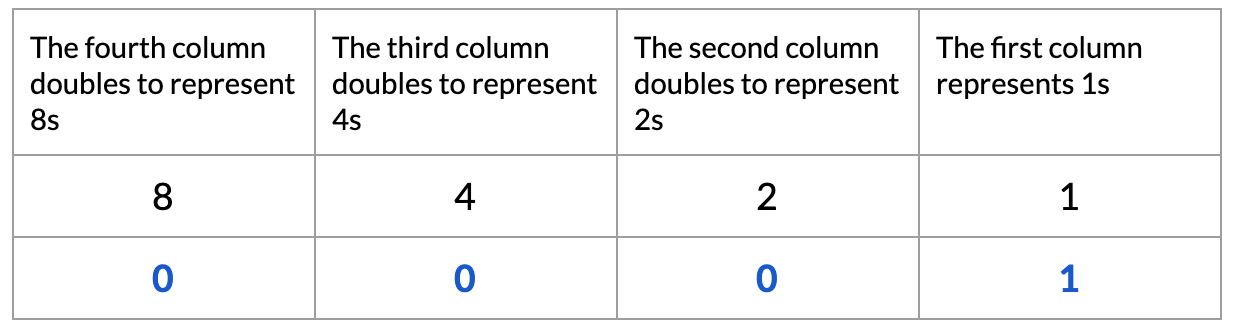
So this binary number (0001) represents the number 1 as it uses no 8s, no 4s, no 2s and one 1.

The binary number 0010 represents the number 2 as it uses no 8s, no 4s, one 2 and no 1s.
How would you represent the number 3 in binary?
0011 represents the number 3 in binary as we need no eights, no fours, one two, one one to make 3 (2 + 1 = 3).

How would you represent the number 10 in binary?

1010 represents the number 10 in binary as we need one eight, no fours, one two, no ones to make 10 (8 + 2 = 10)
Check the students’ understanding of how these numbers are made and represented in binary before introducing the first part of their main task.
Main task
Can you make all the numbers from 0-15 in binary? Ask the students to have a go at completing ‘Showing numbers as binary’. This table asks them to add 1s and 0s to the correct columns to show how each number from 0 - 15 can be made. A few things have been done for them to get them started. There is also a set of extension questions at the bottom of the sheet:
- If we added a 5th binary column what would it represent? 16
- What would be the biggest number we could make now? 31
- What are these numbers in binary:
- 50 = 110010
- 75 = 1001011
- 100 = 1100100
- 127 = 1111111
- 256 = 11111111
What do you need to do to be able to make the last three numbers? These three all need a 7th bit, which represents 64.
Any decimal number can be made using binary code if you add enough bit columns. This conversion of binary to decimal numbers (and vice versa) is a form of code. Do you know any other forms of code or where people might use codes? Codes are used anywhere where people want to protect information and keep it private or sometimes to convert data into another format. They might have heard of morse code, semaphore, ciphers and the famous WW2 Enigma machine.
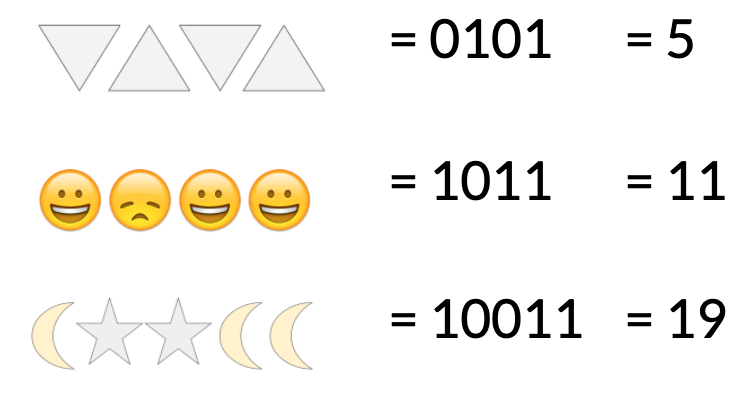
We can add extra levels of encryption to our binary code to make it a bit harder to break, or more useful. We can do this by substituting the 1s and 0s for other things, what could these codes represent?

We can guess at the meaning of each shape, but without a key it’s impossible to be sure what each shape represents, and, in this case, what these binary numbers could be.
But if we know that:

Then we can decode the code to tell that:
Tom's Problem
Next, introduce ‘Tom’s problem’.
“Tom is locked in on the top floor of this building without a phone. Across the street he can see someone working away late into the night. Tom looks around to see what he could use to send a message. Then he has a brilliant idea, he can use the lights! He uses a binary code, which he hopes the person across the street will understand.“
Ask the class:
- Can you work out Tom’s message?
- How could we solve this?
- What do you think the lights represent?
The lights represent binary numbers, a light on = 1 a light off = 0. But is this enough information to work out his message? We also need a key to tell us which letter each number represents.
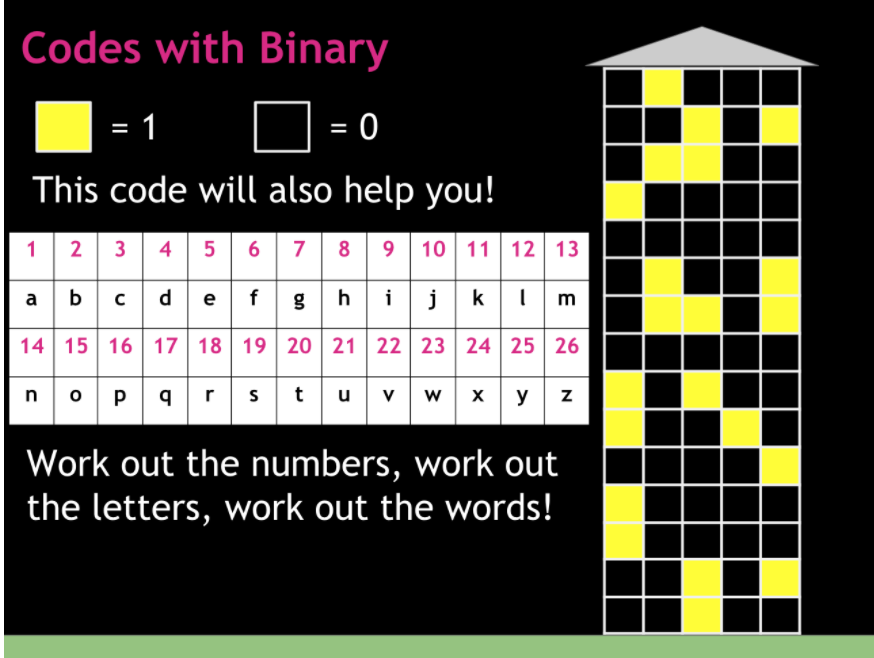
Give each student a copy of Binary code problems and ask them to crack the code and work out Tom’s message (without telling anyone else!)
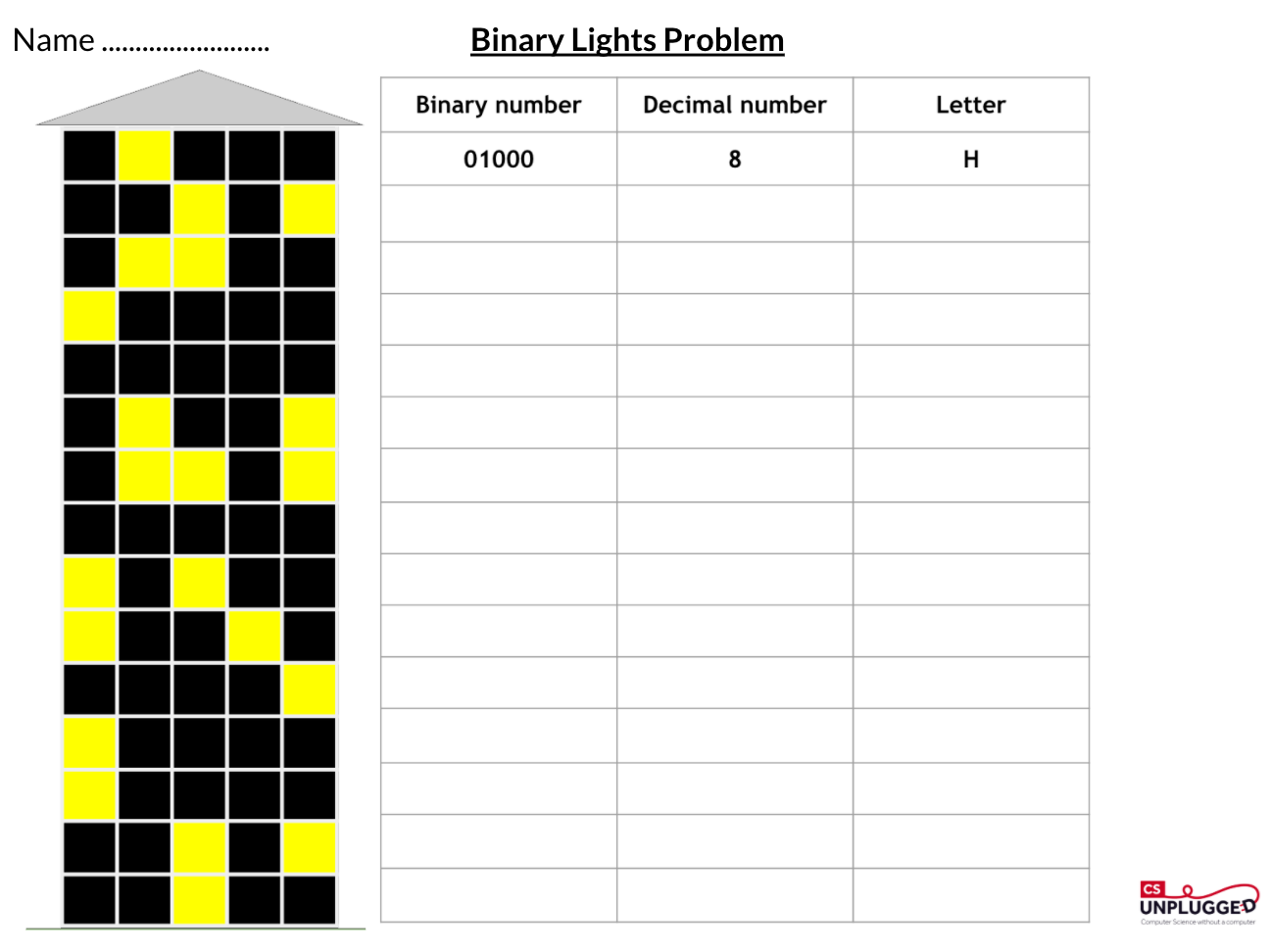
The solution to ‘Tom’s Problem’ is ‘HELP I’M TRAPPED’
Make your own coded message
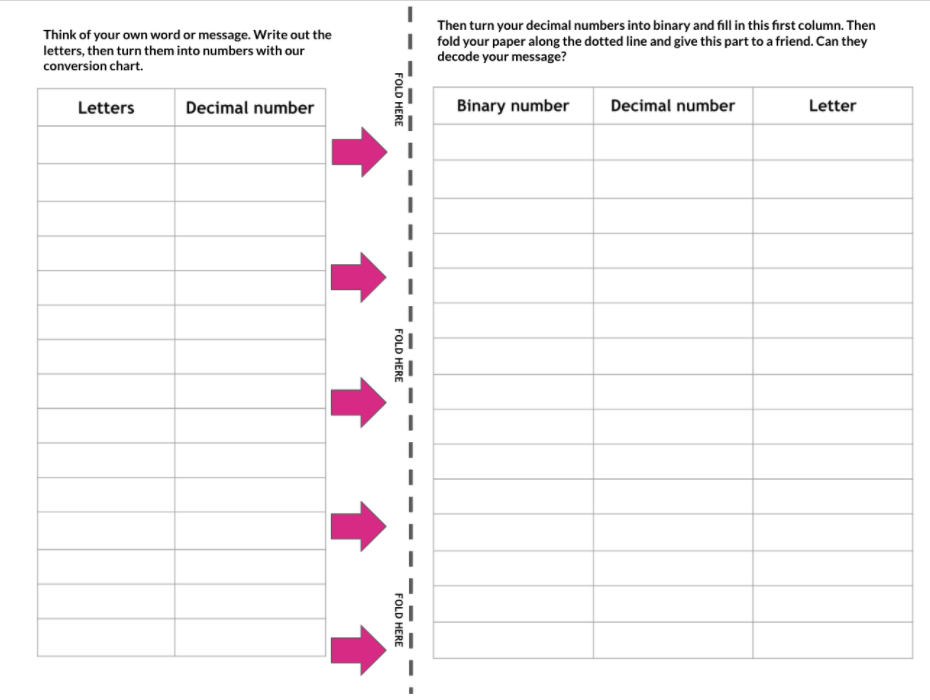
The second side of this activity sheet gives the students a chance to create their own coded message for a friend to decode.
- First they write their own message or word in the first column (going down the page).
- They look at the conversion chart on the board (from Tom’s message activity) and convert their letters into decimal numbers.
- Then they convert their decimal numbers into binary numbers and put these in the the first column of the second table.
- Finally they fold or cut the paper on the dotted line to hide the solution, and pass the sheet to a friend. They must convert the binary numbers back to decimal numbers and then convert those back to letters to decode the message or word.
Plenary
So now we know how binary code can represent decimal numbers, and we’ve already seen how it can then be used to represent other things, such as a written message. In the next lesson we will explore how other things on computers are digitised and represented by binary. How is a photograph saved on a computer as binary data? How is your favourite song turned into binary code?
Binary numbers, reflect the essence of computer hardware: electricity is either on or off. We’ll also explore this more soon, and how computers ‘read’ binary very quickly, but to finish, what do you notice about the common design of the power button on a lot of devices?

(Hint - 1/0!)